When working with LangSmith traces, you may need to prevent sensitive information from being logged to maintain privacy and comply with security requirements. LangSmith provides multiple approaches to protect your data before it’s sent to the backend:
If your compliance or privacy requirements mandate that certain operations should never be traced at all (for example, clients with zero-retention policies), consider using conditional tracing to disable tracing selectively for specific requests instead of masking data.
This works for both the LangSmith SDK (Python and TypeScript) and LangChain.You can also customize and override this behavior for a given Client instance. This can be done by setting the hide_inputs and hide_outputs parameters on the Client object (hideInputs and hideOutputs in TypeScript).The following example returns an empty object for both hide_inputs and hide_outputs, but you can customize this to your needs:
Copy
import openaifrom langsmith import Clientfrom langsmith.wrappers import wrap_openaiopenai_client = wrap_openai(openai.Client())langsmith_client = Client( hide_inputs=lambda inputs: {}, hide_outputs=lambda outputs: {})# The trace produced will have its metadata present, but the inputs will be hiddenopenai_client.chat.completions.create( model="gpt-4.1-mini", messages=[ {"role": "system", "content": "You are a helpful assistant."}, {"role": "user", "content": "Hello!"}, ], langsmith_extra={"client": langsmith_client},)# The trace produced will not have hidden inputs and outputsopenai_client.chat.completions.create( model="gpt-4.1-mini", messages=[ {"role": "system", "content": "You are a helpful assistant."}, {"role": "user", "content": "Hello!"}, ],)
The hide_metadata parameter allows you to control whether run metadata is hidden or transformed when tracing with the LangSmith Python SDK. Metadata is passed with the extra parameter when creating runs (e.g., extra={"metadata": {...}}). hide_metadata is useful for removing sensitive information, complying with privacy requirements, or reducing the amount of data sent to LangSmith. You can configure metadata hiding in two ways:
Using the SDK:
Copy
from langsmith import Clientclient = Client(hide_metadata=True)
Using environment variables:
Copy
export LANGSMITH_HIDE_METADATA=true
The hide_metadata parameter accepts three types of values:
True: Completely removes all metadata (sends an empty dictionary).
False or None: Preserves metadata as-is (default behavior).
Callable: A custom function that transforms the metadata dictionary.
When set, this parameter affects the metadata field in the extra parameter for all runs created or updated by the Client, including runs created through the @traceable decorator or LangChain integrations.
Set hide_metadata=True to remove all metadata completely from runs sent to LangSmith:
Copy
from langsmith import Client# Hide all metadata completelyclient = Client(hide_metadata=True)# Now when you create runs, metadata will be emptyclient.create_run( "my_run", inputs={"question": "What is 2+2?"}, run_type="llm", extra={"metadata": {"user_id": "123", "session": "abc"}})# The metadata sent to LangSmith will be {} instead of the provided metadata
Use a callable function to selectively filter, redact, or modify metadata before it’s sent to LangSmith:
Copy
# Remove sensitive keysdef hide_sensitive_metadata(metadata: dict) -> dict: return {k: v for k, v in metadata.items() if not k.startswith("_private")}client = Client(hide_metadata=hide_sensitive_metadata)# Redact specific valuesdef redact_emails(metadata: dict) -> dict: import re result = {} for k, v in metadata.items(): if isinstance(v, str) and "@" in v: result[k] = "[REDACTED_EMAIL]" else: result[k] = v return resultclient = Client(hide_metadata=redact_emails)# Add transformation markerdef add_marker(metadata: dict) -> dict: return {**metadata, "transformed": True}client = Client(hide_metadata=add_marker)
This feature is available in the following LangSmith SDK versions:
Python: 0.1.81 and above
TypeScript: 0.1.33 and above
To mask specific data in inputs and outputs, you can use the create_anonymizer / createAnonymizer function and pass the newly created anonymizer when instantiating the Client. The anonymizer can be either constructed from a list of regex patterns and the replacement values or from a function that accepts and returns a string value.The anonymizer will be skipped for inputs if LANGSMITH_HIDE_INPUTS = true. Same applies for outputs if LANGSMITH_HIDE_OUTPUTS = true.However, if inputs or outputs are to be sent to Client, the anonymizer method will take precedence over functions found in hide_inputs and hide_outputs. By default, the create_anonymizer will only look at maximum of 10 nesting levels deep, which can be configured via the max_depth parameter.
Copy
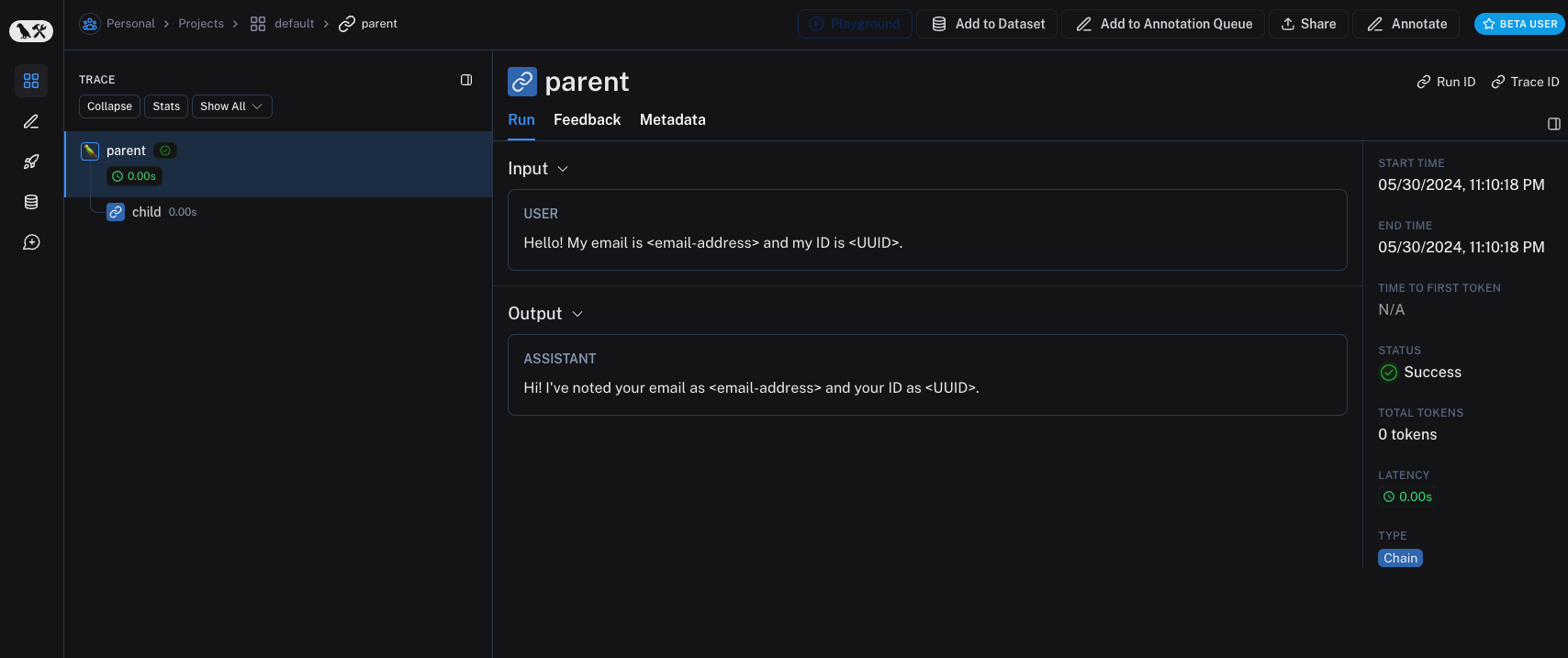
from langsmith.anonymizer import create_anonymizerfrom langsmith import Client, traceableimport re# create anonymizer from list of regex patterns and replacement valuesanonymizer = create_anonymizer([ { "pattern": r"[a-zA-Z0-9._%+-]+@[a-zA-Z0-9.-]+.[a-zA-Z]{2,}", "replace": "<email-address>" }, { "pattern": r"[0-9a-fA-F]{8}-[0-9a-fA-F]{4}-[0-9a-fA-F]{4}-[0-9a-fA-F]{4}-[0-9a-fA-F]{12}", "replace": "<UUID>" }])# or create anonymizer from a functionemail_pattern = re.compile(r"[a-zA-Z0-9._%+-]+@[a-zA-Z0-9.-]+.[a-zA-Z]{2,}")uuid_pattern = re.compile(r"[0-9a-fA-F]{8}-[0-9a-fA-F]{4}-[0-9a-fA-F]{4}-[0-9a-fA-F]{4}-[0-9a-fA-F]{12}")anonymizer = create_anonymizer( lambda text: email_pattern.sub("<email-address>", uuid_pattern.sub("<UUID>", text)))client = Client(anonymizer=anonymizer)@traceable(client=client)def main(inputs: dict) -> dict: ...
Please note, that using the anonymizer might incur a performance hit with complex regular expressions or large payloads, as the anonymizer serializes the payload to JSON before processing.
Improving the performance of anonymizer API is on our roadmap! If you are encountering performance issues, please contact support via support.langchain.com.
Older versions of LangSmith SDKs can use the hide_inputs and hide_outputs parameters to achieve the same effect. You can also use these parameters to process the inputs and outputs more efficiently.
Copy
import refrom langsmith import Client, traceable# Define the regex patterns for email addresses and UUIDsEMAIL_REGEX = r"[a-zA-Z0-9._%+-]+@[a-zA-Z0-9.-]+.[a-zA-Z]{2,}"UUID_REGEX = r"[0-9a-fA-F]{8}-[0-9a-fA-F]{4}-[0-9a-fA-F]{4}-[0-9a-fA-F]{4}-[0-9a-fA-F]{12}"def replace_sensitive_data(data, depth=10): if depth == 0: return data if isinstance(data, dict): return {k: replace_sensitive_data(v, depth-1) for k, v in data.items()} elif isinstance(data, list): return [replace_sensitive_data(item, depth-1) for item in data] elif isinstance(data, str): data = re.sub(EMAIL_REGEX, "<email-address>", data) data = re.sub(UUID_REGEX, "<UUID>", data) return data else: return dataclient = Client( hide_inputs=lambda inputs: replace_sensitive_data(inputs), hide_outputs=lambda outputs: replace_sensitive_data(outputs))inputs = {"role": "user", "content": "Hello! My email is user@example.com and my ID is 123e4567-e89b-12d3-a456-426614174000."}outputs = {"role": "assistant", "content": "Hi! I've noted your email as user@example.com and your ID as 123e4567-e89b-12d3-a456-426614174000."}@traceable(client=client)def child(inputs: dict) -> dict: return outputs@traceable(client=client)def parent(inputs: dict) -> dict: child_outputs = child(inputs) return child_outputsparent(inputs)
Processing inputs and outputs for a single function
The process_outputs parameter is available in LangSmith SDK version 0.1.98 and above for Python.
In addition to Client-level input and output processing, LangSmith provides function-level processing through the process_inputs and process_outputs parameters of the @traceable decorator.These parameters accept functions that allow you to transform the inputs and outputs of a specific function before they are logged to LangSmith. This is useful for reducing payload size, removing sensitive information, or customizing how an object should be serialized and represented in LangSmith for a particular function.Here’s an example of how to use process_inputs and process_outputs:
Copy
from langsmith import traceabledef process_inputs(inputs: dict) -> dict: # inputs is a dictionary where keys are argument names and values are the provided arguments # Return a new dictionary with processed inputs return { "processed_key": inputs.get("my_cool_key", "default"), "length": len(inputs.get("my_cool_key", "")) }def process_outputs(output: Any) -> dict: # output is the direct return value of the function # Transform the output into a dictionary # In this case, "output" will be an integer return {"processed_output": str(output)}@traceable(process_inputs=process_inputs, process_outputs=process_outputs)def my_function(my_cool_key: str) -> int: # Function implementation return len(my_cool_key)result = my_function("example")
In this example, process_inputs creates a new dictionary with processed input data, and process_outputs transforms the output into a specific format before logging to LangSmith.
It’s recommended to avoid mutating the source objects in the processor functions. Instead, create and return new objects with the processed data.
You can combine rule-based masking with various anonymizers to scrub sensitive information from inputs and outputs. The following examples will cover working with regex, Microsoft Presidio, and Amazon Comprehend.
The implementation below is not exhaustive and may miss some formats or edge cases. Test any implementation thoroughly before using it in production.
You can use regex to mask inputs and outputs before they are sent to LangSmith. The implementation below masks email addresses, phone numbers, full names, credit card numbers, and SSNs.
Copy
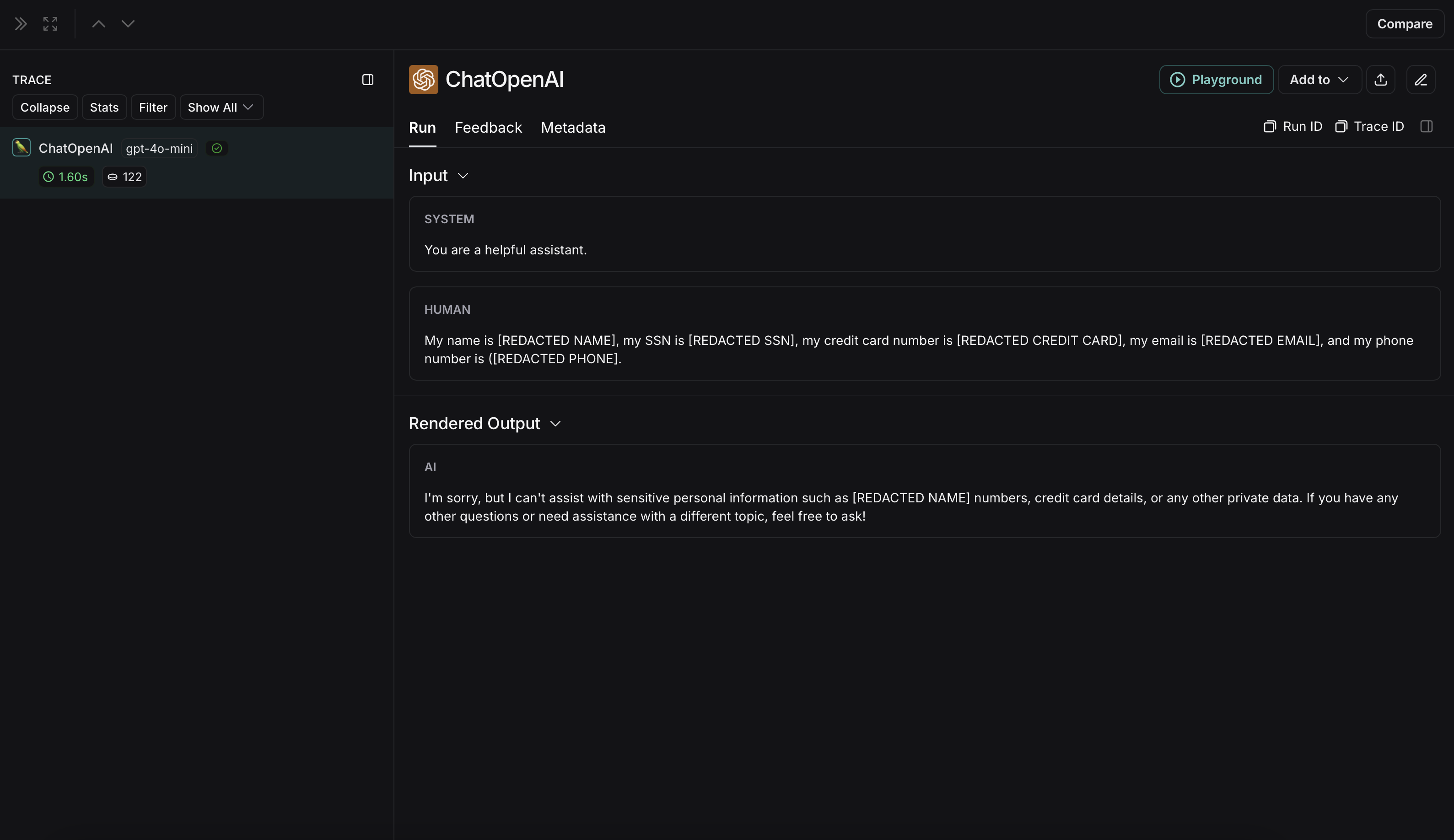
import reimport openaifrom langsmith import Clientfrom langsmith.wrappers import wrap_openai# Define regex patterns for various PIISSN_PATTERN = re.compile(r'\b\d{3}-\d{2}-\d{4}\b')CREDIT_CARD_PATTERN = re.compile(r'\b(?:\d[ -]*?){13,16}\b')EMAIL_PATTERN = re.compile(r'\b[A-Za-z0-9._%+-]+@[A-Za-z0-9.-]+\.[A-Z|a-z]{2,7}\b')PHONE_PATTERN = re.compile(r'\b(?:\+?1[-.\s]?)?\(?\d{3}\)?[-.\s]?\d{3}[-.\s]?\d{4}\b')FULL_NAME_PATTERN = re.compile(r'\b([A-Z][a-z]*\s[A-Z][a-z]*)\b')def regex_anonymize(text): """ Anonymize sensitive information in the text using regex patterns. Args: text (str): The input text to be anonymized. Returns: str: The anonymized text. """ # Replace sensitive information with placeholders text = SSN_PATTERN.sub('[REDACTED SSN]', text) text = CREDIT_CARD_PATTERN.sub('[REDACTED CREDIT CARD]', text) text = EMAIL_PATTERN.sub('[REDACTED EMAIL]', text) text = PHONE_PATTERN.sub('[REDACTED PHONE]', text) text = FULL_NAME_PATTERN.sub('[REDACTED NAME]', text) return textdef recursive_anonymize(data, depth=10): """ Recursively traverse the data structure and anonymize sensitive information. Args: data (any): The input data to be anonymized. depth (int): The current recursion depth to prevent excessive recursion. Returns: any: The anonymized data. """ if depth == 0: return data if isinstance(data, dict): anonymized_dict = {} for k, v in data.items(): anonymized_value = recursive_anonymize(v, depth - 1) anonymized_dict[k] = anonymized_value return anonymized_dict elif isinstance(data, list): anonymized_list = [] for item in data: anonymized_item = recursive_anonymize(item, depth - 1) anonymized_list.append(anonymized_item) return anonymized_list elif isinstance(data, str): anonymized_data = regex_anonymize(data) return anonymized_data else: return dataopenai_client = wrap_openai(openai.Client())# Initialize the LangSmith [Client](https://reference.langchain.com/python/langsmith/client/Client) with the anonymization functionslangsmith_client = Client( hide_inputs=recursive_anonymize, hide_outputs=recursive_anonymize)# The trace produced will have its metadata present, but the inputs and outputs will be anonymizedresponse_with_anonymization = openai_client.chat.completions.create( model="gpt-4.1-mini", messages=[ {"role": "system", "content": "You are a helpful assistant."}, {"role": "user", "content": "My name is John Doe, my SSN is 123-45-6789, my credit card number is 4111 1111 1111 1111, my email is john.doe@example.com, and my phone number is (123) 456-7890."}, ], langsmith_extra={"client": langsmith_client},)# The trace produced will not have anonymized inputs and outputsresponse_without_anonymization = openai_client.chat.completions.create( model="gpt-4.1-mini", messages=[ {"role": "system", "content": "You are a helpful assistant."}, {"role": "user", "content": "My name is John Doe, my SSN is 123-45-6789, my credit card number is 4111 1111 1111 1111, my email is john.doe@example.com, and my phone number is (123) 456-7890."}, ],)
The anonymized run will look like this in LangSmith: The non-anonymized run will look like this in LangSmith:
The implementation below provides a general example of how to anonymize sensitive information in messages exchanged between a user and an LLM. It is not exhaustive and does not account for all cases. Test any implementation thoroughly before using it in production.
Microsoft Presidio is a data protection and de-identification SDK. The implementation below uses Presidio to anonymize inputs and outputs before they are sent to LangSmith. For up to date information, please refer to Presidio’s official documentation.To use Presidio and its spaCy model, install the following:
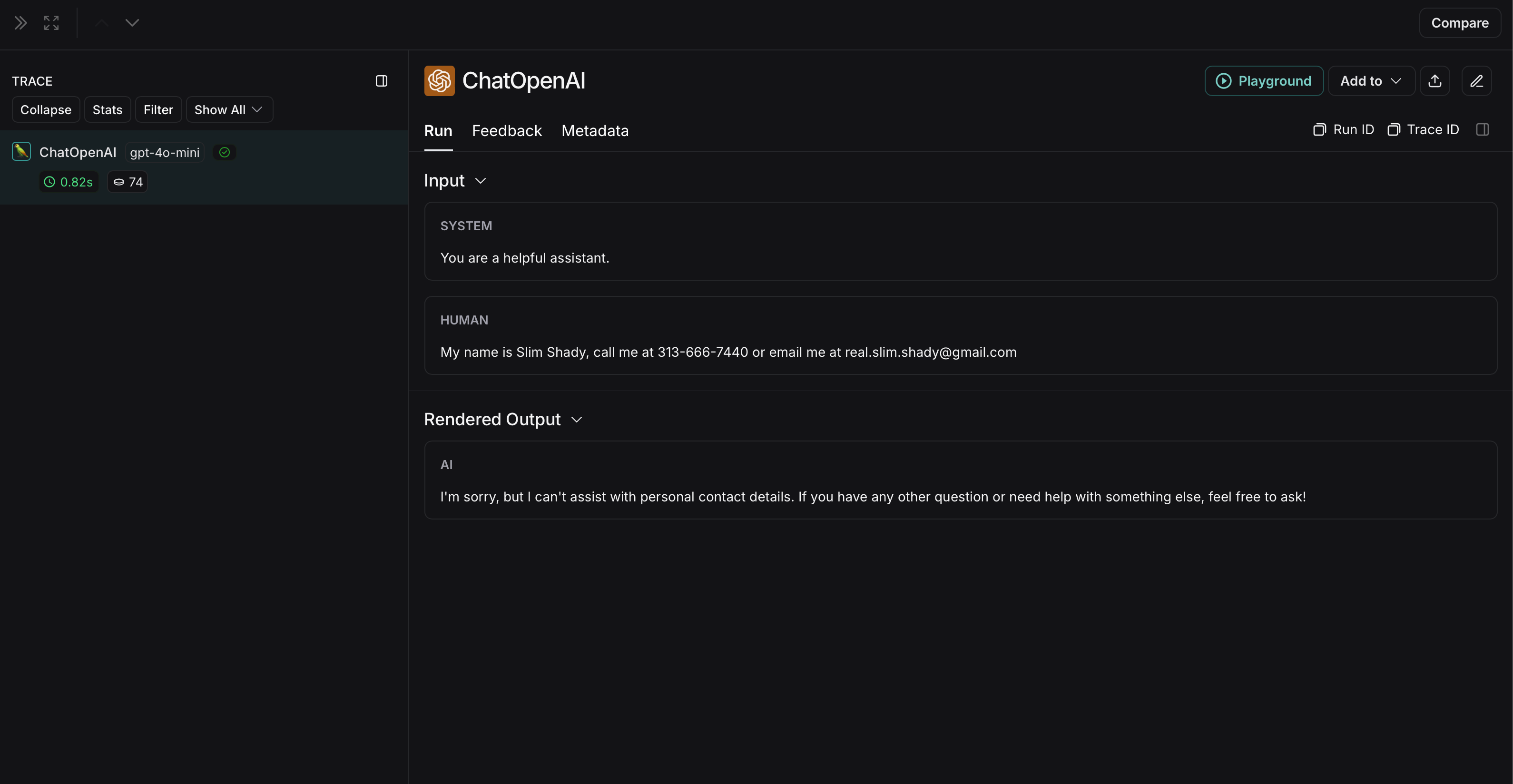
import openaifrom langsmith import Clientfrom langsmith.wrappers import wrap_openaifrom presidio_anonymizer import AnonymizerEnginefrom presidio_analyzer import AnalyzerEngineanonymizer = AnonymizerEngine()analyzer = AnalyzerEngine()def presidio_anonymize(data): """ Anonymize sensitive information sent by the user or returned by the model. Args: data (any): The data to be anonymized. Returns: any: The anonymized data. """ message_list = ( data.get('messages') or [data.get('choices', [{}])[0].get('message')] ) if not message_list or not all(isinstance(msg, dict) and msg for msg in message_list): return data for message in message_list: content = message.get('content', '') if not content.strip(): print("Empty content detected. Skipping anonymization.") continue results = analyzer.analyze( text=content, entities=["PERSON", "PHONE_NUMBER", "EMAIL_ADDRESS", "US_SSN"], language='en' ) anonymized_result = anonymizer.anonymize( text=content, analyzer_results=results ) message['content'] = anonymized_result.text return dataopenai_client = wrap_openai(openai.Client())# initialize the langsmith [Client](https://reference.langchain.com/python/langsmith/client/Client) with the anonymization functionslangsmith_client = Client( hide_inputs=presidio_anonymize, hide_outputs=presidio_anonymize)# The trace produced will have its metadata present, but the inputs and outputs will be anonymizedresponse_with_anonymization = openai_client.chat.completions.create( model="gpt-4.1-mini", messages=[ {"role": "system", "content": "You are a helpful assistant."}, {"role": "user", "content": "My name is Slim Shady, call me at 313-666-7440 or email me at real.slim.shady@gmail.com"}, ], langsmith_extra={"client": langsmith_client},)# The trace produced will not have anonymized inputs and outputsresponse_without_anonymization = openai_client.chat.completions.create( model="gpt-4.1-mini", messages=[ {"role": "system", "content": "You are a helpful assistant."}, {"role": "user", "content": "My name is Slim Shady, call me at 313-666-7440 or email me at real.slim.shady@gmail.com"}, ],)
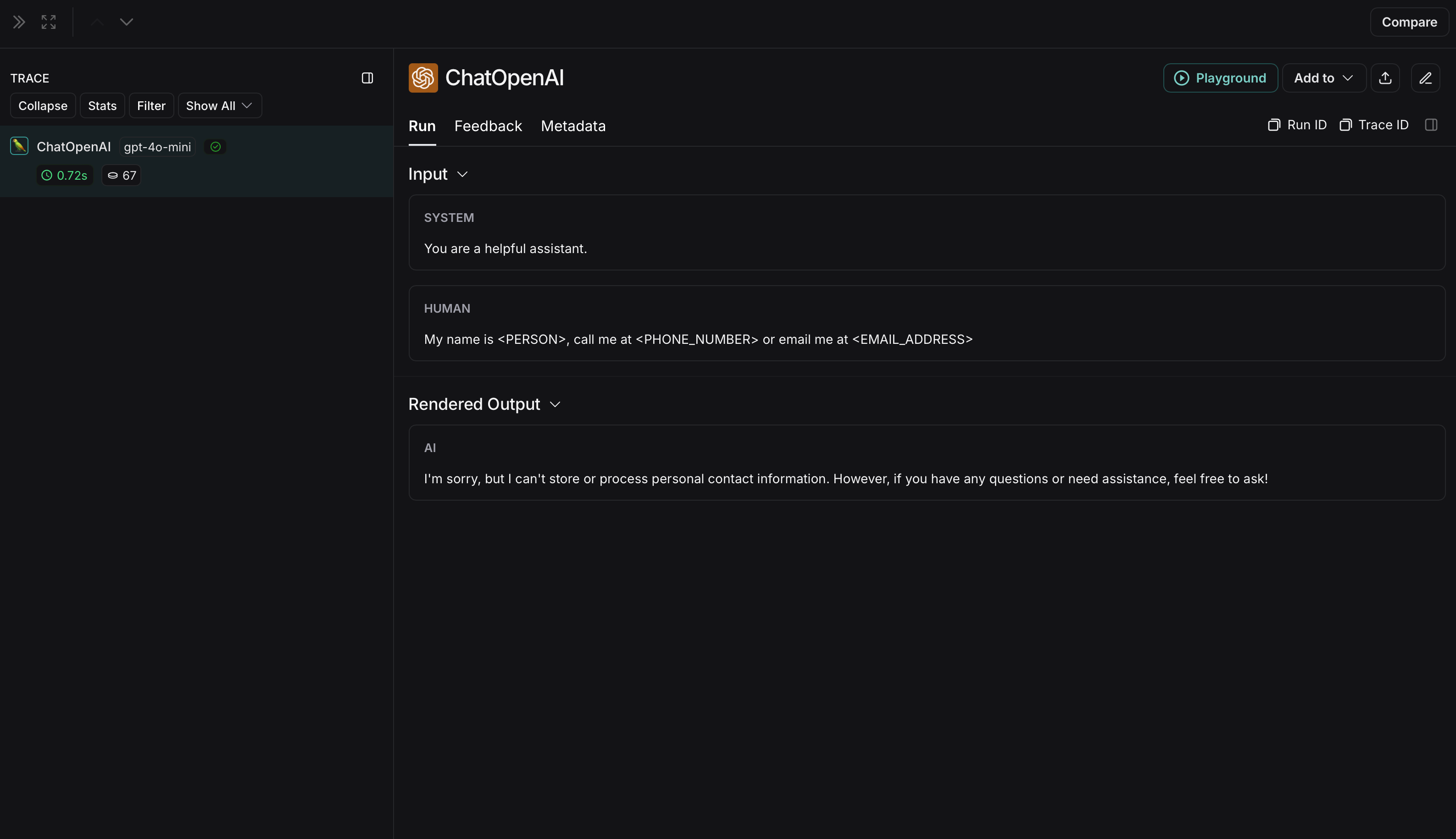
The anonymized run will look like this in LangSmith: The non-anonymized run will look like this in LangSmith:
The implementation below provides a general example of how to anonymize sensitive information in messages exchanged between a user and an LLM. It is not exhaustive and does not account for all cases. Test any implementation thoroughly before using it in production.
Comprehend is a natural language processing service that can detect personally identifiable information. The implementation below uses Comprehend to anonymize inputs and outputs before they are sent to LangSmith. For up to date information, please refer to Comprehend’s official documentation.To use Comprehend, install boto3:
Copy
pip install boto3
Also, install OpenAI:
Copy
pip install openai
You will need to set up credentials in AWS and authenticate using the AWS CLI. Follow the instructions here.
Copy
import openaiimport boto3from langsmith import Clientfrom langsmith.wrappers import wrap_openaicomprehend = boto3.client('comprehend', region_name='us-east-1')def redact_pii_entities(text, entities): """ Redact PII entities in the text based on the detected entities. Args: text (str): The original text containing PII. entities (list): A list of detected PII entities. Returns: str: The text with PII entities redacted. """ sorted_entities = sorted(entities, key=lambda x: x['BeginOffset'], reverse=True) redacted_text = text for entity in sorted_entities: begin = entity['BeginOffset'] end = entity['EndOffset'] entity_type = entity['Type'] # Define the redaction placeholder based on entity type placeholder = f"[{entity_type}]" # Replace the PII in the text with the placeholder redacted_text = redacted_text[:begin] + placeholder + redacted_text[end:] return redacted_textdef detect_pii(text): """ Detect PII entities in the given text using AWS Comprehend. Args: text (str): The text to analyze. Returns: list: A list of detected PII entities. """ try: response = comprehend.detect_pii_entities( Text=text, LanguageCode='en', ) entities = response.get('Entities', []) return entities except Exception as e: print(f"Error detecting PII: {e}") return []def comprehend_anonymize(data): """ Anonymize sensitive information sent by the user or returned by the model. Args: data (any): The input data to be anonymized. Returns: any: The anonymized data. """ message_list = ( data.get('messages') or [data.get('choices', [{}])[0].get('message')] ) if not message_list or not all(isinstance(msg, dict) and msg for msg in message_list): return data for message in message_list: content = message.get('content', '') if not content.strip(): print("Empty content detected. Skipping anonymization.") continue entities = detect_pii(content) if entities: anonymized_text = redact_pii_entities(content, entities) message['content'] = anonymized_text else: print("No PII detected. Content remains unchanged.") return dataopenai_client = wrap_openai(openai.Client())# initialize the langsmith [Client](https://reference.langchain.com/python/langsmith/client/Client) with the anonymization functionslangsmith_client = Client( hide_inputs=comprehend_anonymize, hide_outputs=comprehend_anonymize)# The trace produced will have its metadata present, but the inputs and outputs will be anonymizedresponse_with_anonymization = openai_client.chat.completions.create( model="gpt-4.1-mini", messages=[ {"role": "system", "content": "You are a helpful assistant."}, {"role": "user", "content": "My name is Slim Shady, call me at 313-666-7440 or email me at real.slim.shady@gmail.com"}, ], langsmith_extra={"client": langsmith_client},)# The trace produced will not have anonymized inputs and outputsresponse_without_anonymization = openai_client.chat.completions.create( model="gpt-4.1-mini", messages=[ {"role": "system", "content": "You are a helpful assistant."}, {"role": "user", "content": "My name is Slim Shady, call me at 313-666-7440 or email me at real.slim.shady@gmail.com"}, ],)
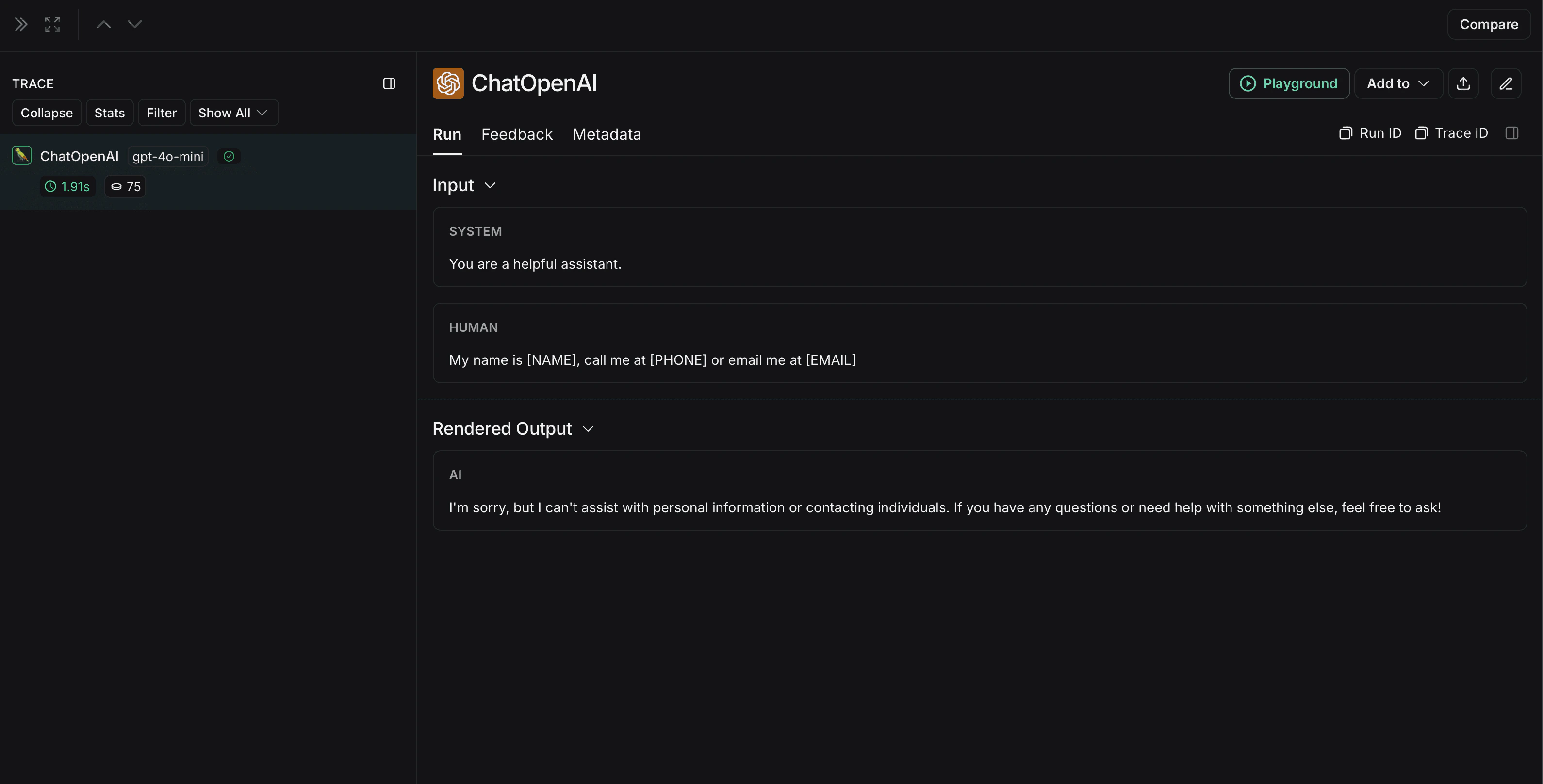
The anonymized run will look like this in LangSmith: The non-anonymized run will look like this in LangSmith:


 The non-anonymized run will look like this in LangSmith: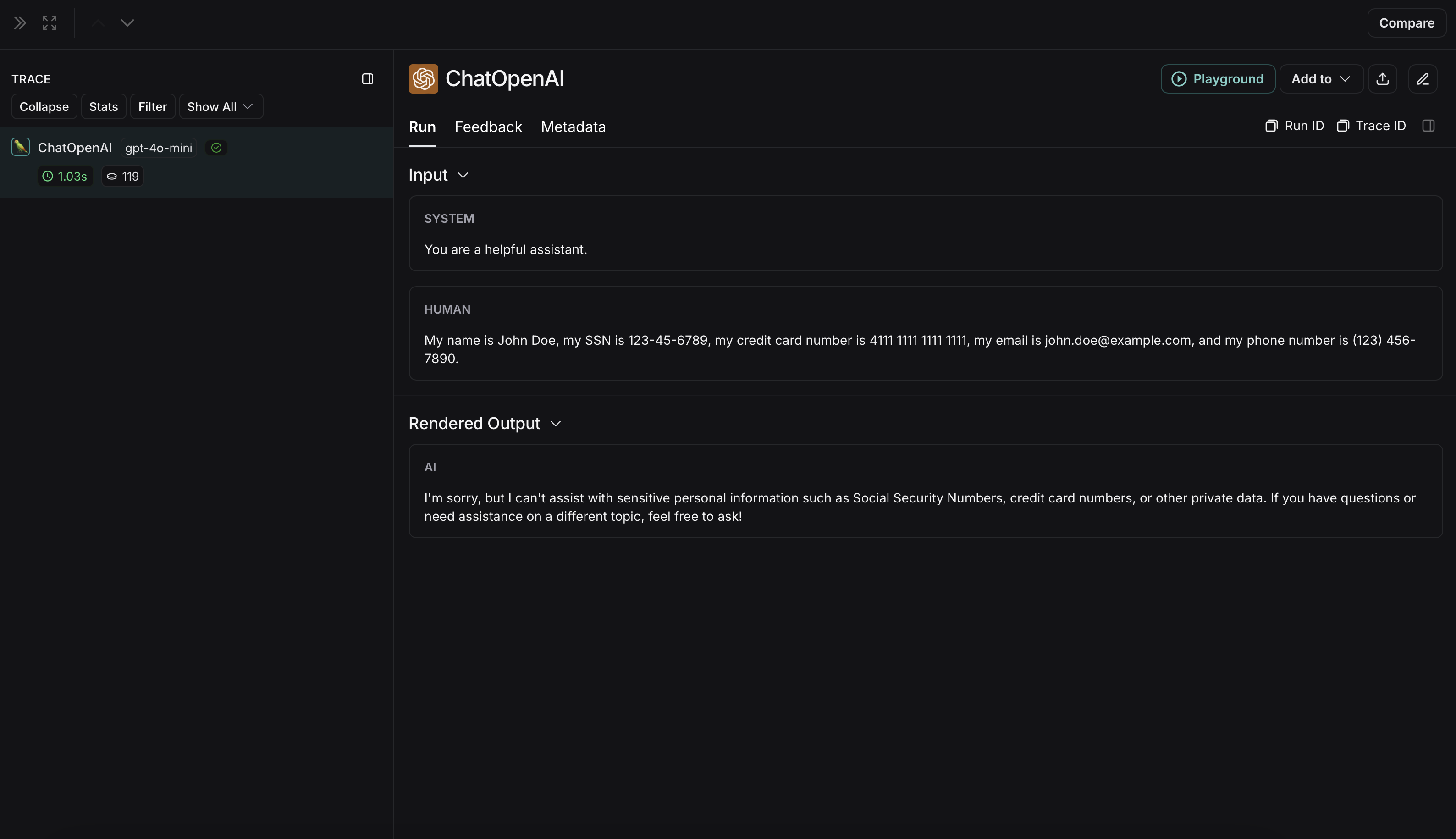
 The non-anonymized run will look like this in LangSmith: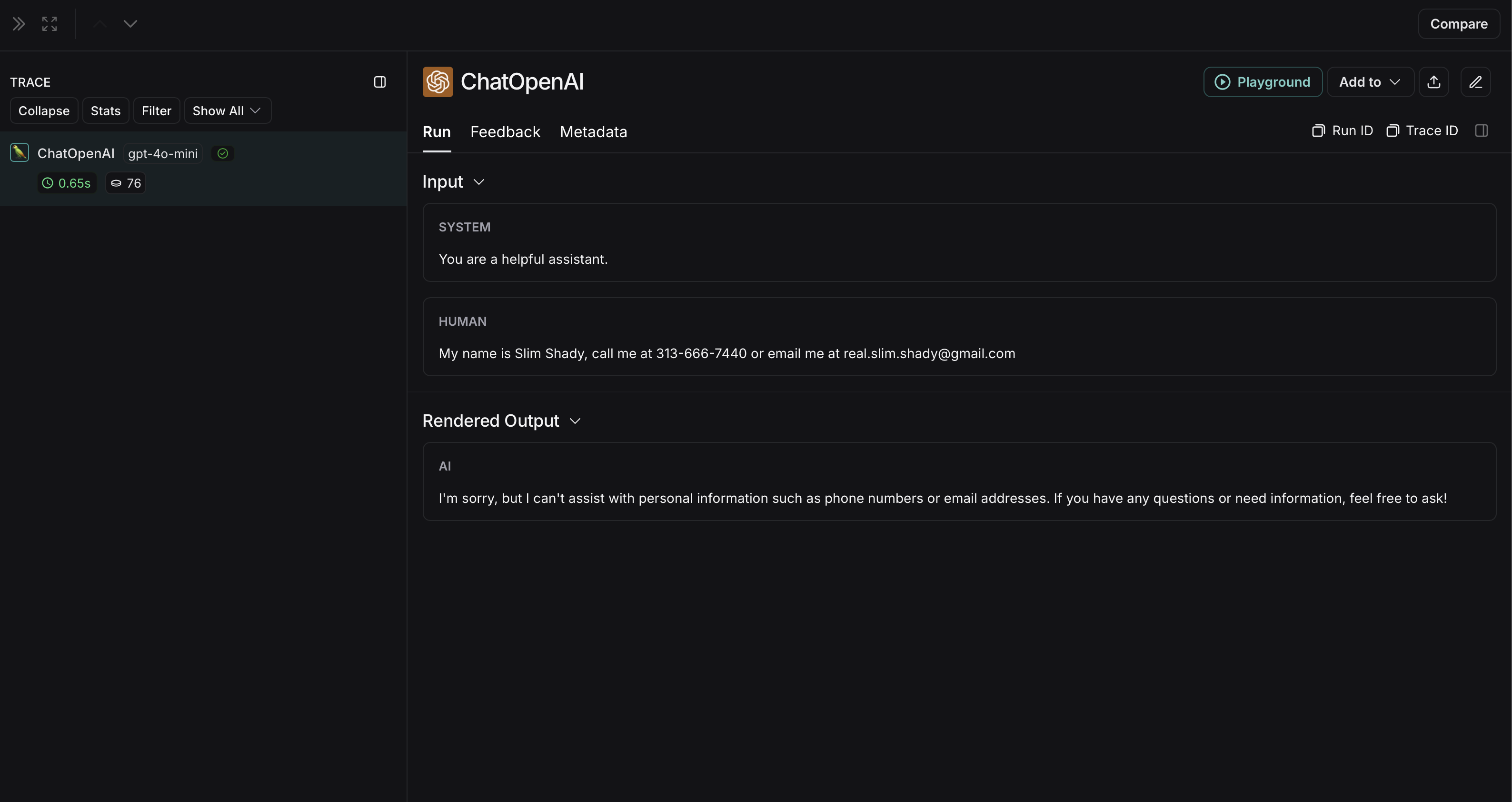
 The non-anonymized run will look like this in LangSmith: