Deploying your application is just the beginning of a continuous improvement process. After you deploy to production, you’ll want to refine your system by enhancing prompts, language models, tools, and architectures. Backtesting involves assessing new versions of your application using historical data and comparing the new outputs to the original ones. Compared to evaluations using pre-production datasets, backtesting offers a clearer indication of whether the new version of your application is an improvement over the current deployment.Here are the basic steps for backtesting:
Select sample runs from your production tracing project to test against.
Transform the run inputs into a dataset and record the run outputs as an initial experiment against that dataset.
Execute your new system on the new dataset and compare the results of the experiments.
This process will provide you with a new dataset of representative inputs, which you can version and use for backtesting your models.
Often, you won’t have definitive “ground truth” answers available. In such cases, you can manually label the outputs or use evaluators that don’t rely on reference data. If your application allows for capturing ground-truth labels, for example by allowing users to leave feedback, we strongly recommend doing so.
import getpassimport os# Set the project name to whichever project you'd like to be testing againstproject_name = "Tweet Writing Task"os.environ["LANGSMITH_PROJECT"] = project_nameos.environ["LANGSMITH_TRACING"] = "true"if not os.environ.get("LANGSMITH_API_KEY"): os.environ["LANGSMITH_API_KEY"] = getpass.getpass("YOUR API KEY")# Optional. You can swap OpenAI for any other tool-calling chat model.os.environ["OPENAI_API_KEY"] = "YOUR OPENAI API KEY"# Optional. You can swap Tavily for the free DuckDuckGo search tool if preferred.# Get Tavily API key: https://tavily.comos.environ["TAVILY_API_KEY"] = "YOUR TAVILY API KEY"
For this example lets create a simple Tweet-writing application that has access to some internet search tools:
Copy
from langchain.chat_models import init_chat_modelfrom langchain.agents import create_agentfrom langchain_community.tools import DuckDuckGoSearchRun, TavilySearchResultsfrom langchain_core.rate_limiters import InMemoryRateLimiter# We will use GPT-3.5 Turbo as the baseline and compare against GPT-4ogpt_3_5_turbo = init_chat_model( "gpt-3.5-turbo", temperature=1, configurable_fields=("model", "model_provider"),)# The instrucitons are passed as a system message to the agentinstructions = """You are a tweet writing assistant. Given a topic, do some research and write a relevant and engaging tweet about it.- Use at least 3 emojis in each tweet- The tweet should be no longer than 280 characters- Always use the search tool to gather recent information on the tweet topic- Write the tweet only based on the search content. Do not rely on your internal knowledge- When relevant, link to your sources- Make your tweet as engaging as possible"""# Define the tools our agent can use# If you have a higher tiered Tavily API plan you can increase thisrate_limiter = InMemoryRateLimiter(requests_per_second=0.08)# Use DuckDuckGo if you don't have a Tavily API key:# tools = [DuckDuckGoSearchRun(rate_limiter=rate_limiter)]tools = [TavilySearchResults(max_results=5, rate_limiter=rate_limiter)]agent = create_agent(gpt_3_5_turbo, tools=tools, system_prompt=instructions)
fake_production_inputs = [ "Alan turing's early childhood", "Economic impacts of the European Union", "Underrated philosophers", "History of the Roxie theater in San Francisco", "ELI5: gravitational waves", "The arguments for and against a parliamentary system", "Pivotal moments in music history", "Big ideas in programming languages", "Big questions in biology", "The relationship between math and reality", "What makes someone funny",]agent.batch( [{"messages": [{"role": "user", "content": content}]} for content in fake_production_inputs],)
You can select the runs to backtest on using the filter argument of list_runs. The filter argument uses the LangSmith trace query syntax to select runs.
Copy
from datetime import datetime, timedelta, timezonefrom uuid import uuid4from langsmith import Clientfrom langsmith.beta import convert_runs_to_test# Fetch the runs we want to convert to a dataset/experimentclient = Client()# How we are sampling runs to include in our datasetend_time = datetime.now(tz=timezone.utc)start_time = end_time - timedelta(days=1)run_filter = f'and(gt(start_time, "{start_time.isoformat()}"), lt(end_time, "{end_time.isoformat()}"))'prod_runs = list( client.list_runs( project_name=project_name, is_root=True, filter=run_filter, ))
convert_runs_to_test is a function which takes some runs and does the following:
The inputs, and optionally the outputs, are saved to a dataset as Examples.
The inputs and outputs are stored as an experiment, as if you had run the evaluate function and received those outputs.
Copy
# Name of the dataset we want to createdataset_name = f'{project_name}-backtesting {start_time.strftime("%Y-%m-%d")}-{end_time.strftime("%Y-%m-%d")}'# Name of the experiment we want to create from the historical runsbaseline_experiment_name = f"prod-baseline-gpt-3.5-turbo-{str(uuid4())[:4]}"# This converts the runs to a dataset + experimentconvert_runs_to_test( prod_runs, # Name of the resulting dataset dataset_name=dataset_name, # Whether to include the run outputs as reference/ground truth include_outputs=False, # Whether to include the full traces in the resulting experiment # (default is to just include the root run) load_child_runs=True, # Name of the experiment so we can apply evalautors to it after test_project_name=baseline_experiment_name)
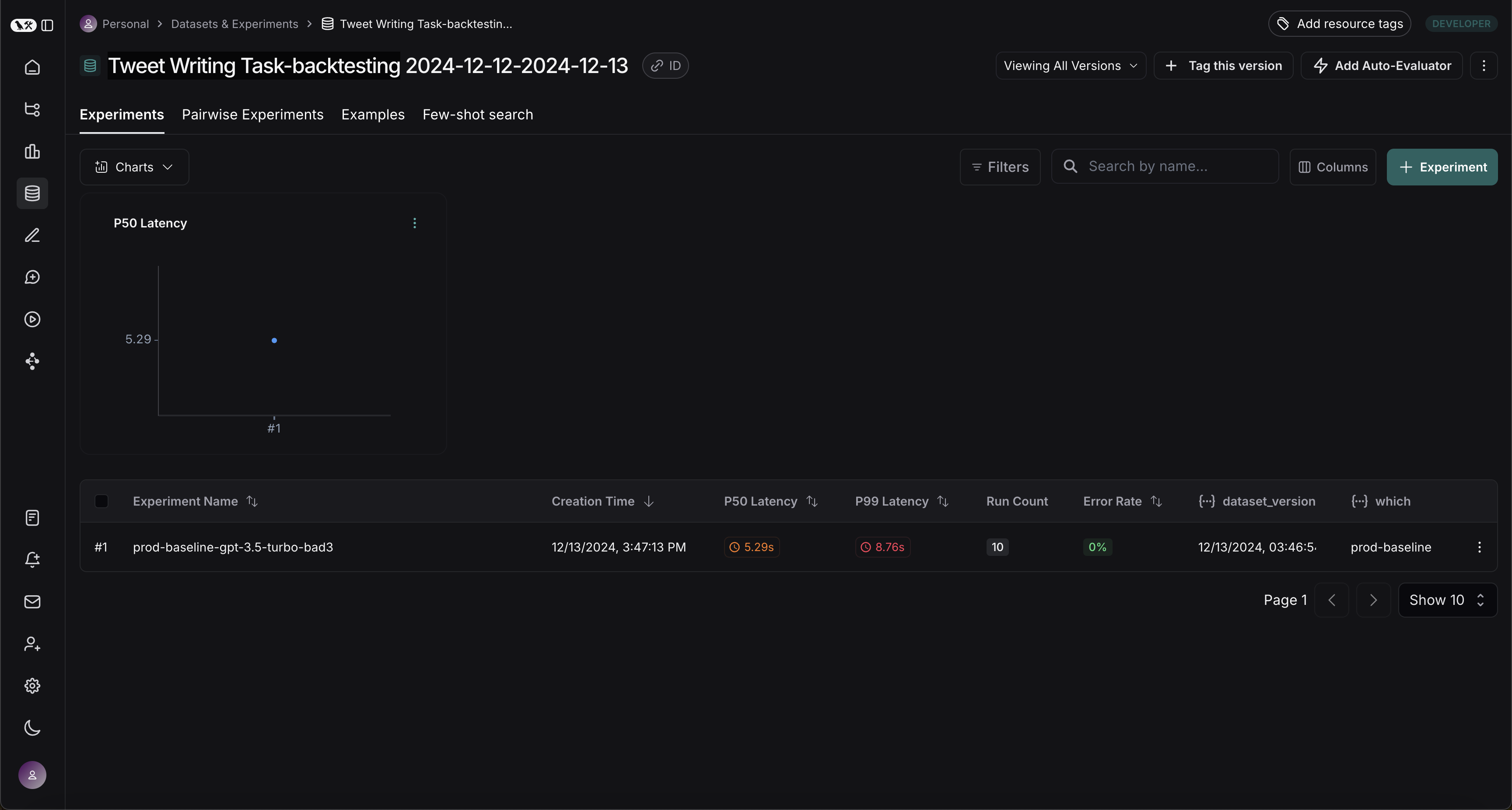
Once this step is complete, you should see a new dataset in your LangSmith project called “Tweet Writing Task-backtesting TODAYS DATE”, with a single experiment like so:
First let’s define the evaluators we will use to compare the two systems. Note that we have no reference outputs, so we’ll need to come up with evaluation metrics that only require the actual outputs.
Copy
import emojifrom pydantic import BaseModel, Fieldfrom langchain_core.messages import convert_to_openai_messagesclass Grade(BaseModel): """Grade whether a response is supported by some context.""" grounded: bool = Field(..., description="Is the majority of the response supported by the retrieved context?")grounded_instructions = f"""You have given somebody some contextual information and asked them to write a statement grounded in that context.Grade whether their response is fully supported by the context you have provided. \If any meaningful part of their statement is not backed up directly by the context you provided, then their response is not grounded. \Otherwise it is grounded."""grounded_model = init_chat_model(model="gpt-4.1").with_structured_output(Grade)def lt_280_chars(outputs: dict) -> bool: messages = convert_to_openai_messages(outputs["messages"]) return len(messages[-1]['content']) <= 280def gte_3_emojis(outputs: dict) -> bool: messages = convert_to_openai_messages(outputs["messages"]) return len(emoji.emoji_list(messages[-1]['content'])) >= 3async def is_grounded(outputs: dict) -> bool: context = "" messages = convert_to_openai_messages(outputs["messages"]) for message in messages: if message["role"] == "tool": # Tool message outputs are the results returned from the Tavily/DuckDuckGo tool context += "\n\n" + message["content"] tweet = messages[-1]["content"] user = f"""CONTEXT PROVIDED: {context} RESPONSE GIVEN: {tweet}""" grade = await grounded_model.ainvoke([ {"role": "system", "content": grounded_instructions}, {"role": "user", "content": user} ]) return grade.grounded
Now, let’s run our evaluators against the baseline experiment.
Copy
baseline_results = await client.aevaluate( baseline_experiment_name, evaluators=[lt_280_chars, gte_3_emojis, is_grounded],)# If you have pandas installed can easily explore results as df:# baseline_results.to_pandas()
Now, let’s define and evaluate our new system. In this example our new system will be the same as the old system, but will use GPT-4o instead of GPT-3.5. Since we’ve made our model configurable we can just update the default config passed to our agent:
Copy
candidate_results = await client.aevaluate( agent.with_config(model="gpt-4.1"), data=dataset_name, evaluators=[lt_280_chars, gte_3_emojis, is_grounded], experiment_prefix="candidate-gpt-4.1",)# If you have pandas installed can easily explore results as df:# candidate_results.to_pandas()
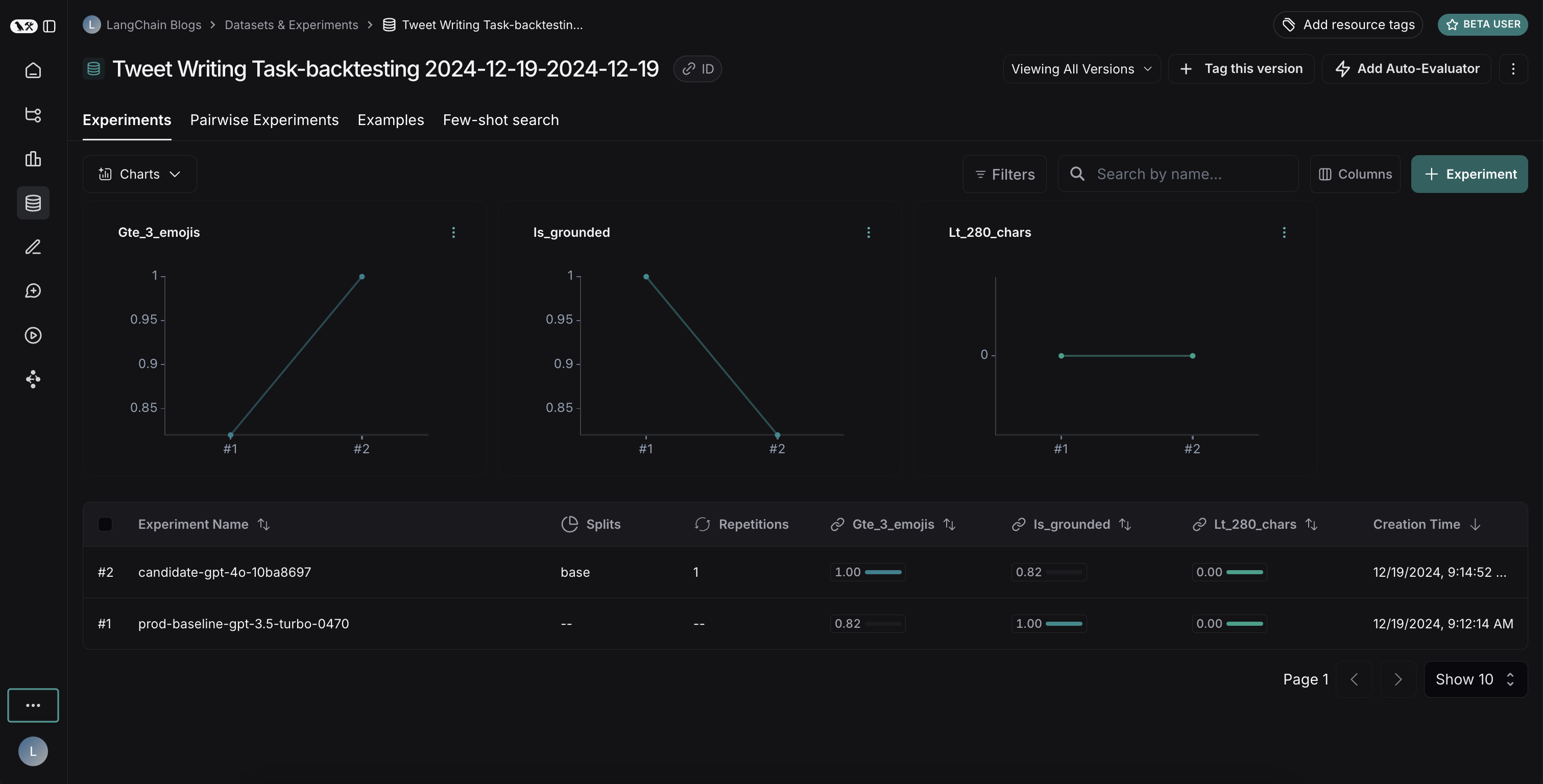
After running both experiments, you can view them in your dataset:The results reveal an interesting tradeoff between the two models:
GPT-4o shows improved performance in following formatting rules, consistently including the requested number of emojis
However, GPT-4o is less reliable at staying grounded in the provided search results
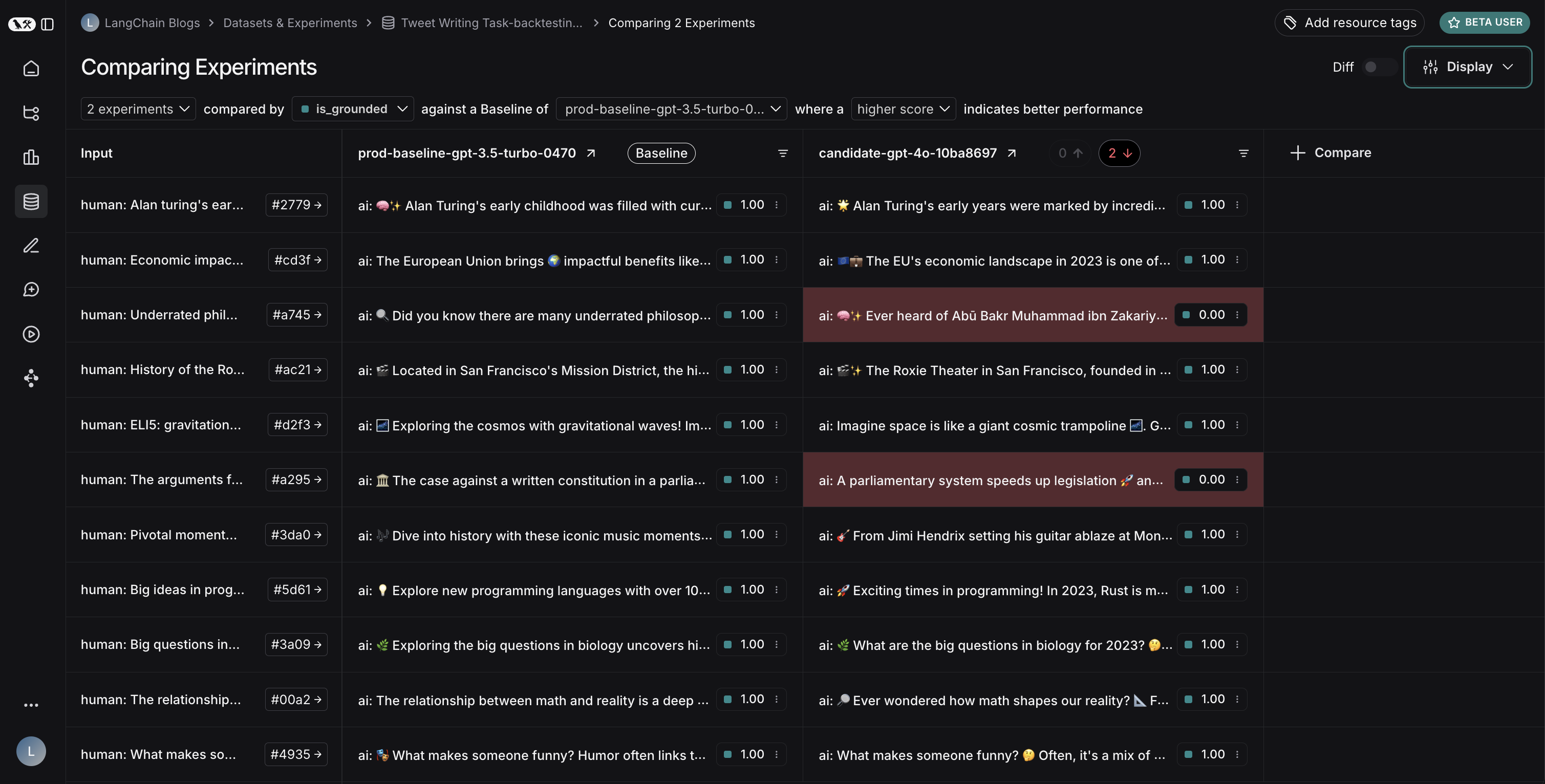
To illustrate the grounding issue: in this example run, GPT-4o included facts about Abū Bakr Muhammad ibn Zakariyyā al-Rāzī’s medical contributions that weren’t present in the search results. This demonstrates how it’s pulling from its internal knowledge rather than strictly using the provided information.This backtesting exercise revealed that while GPT-4o is generally considered a more capable model, simply upgrading to it wouldn’t improve our tweet-writer. To effectively use GPT-4o, we would need to:
Refine our prompts to more strongly emphasize using only provided information
Or modify our system architecture to better constrain the model’s outputs
This insight demonstrates the value of backtesting - it helped us identify potential issues before deployment.