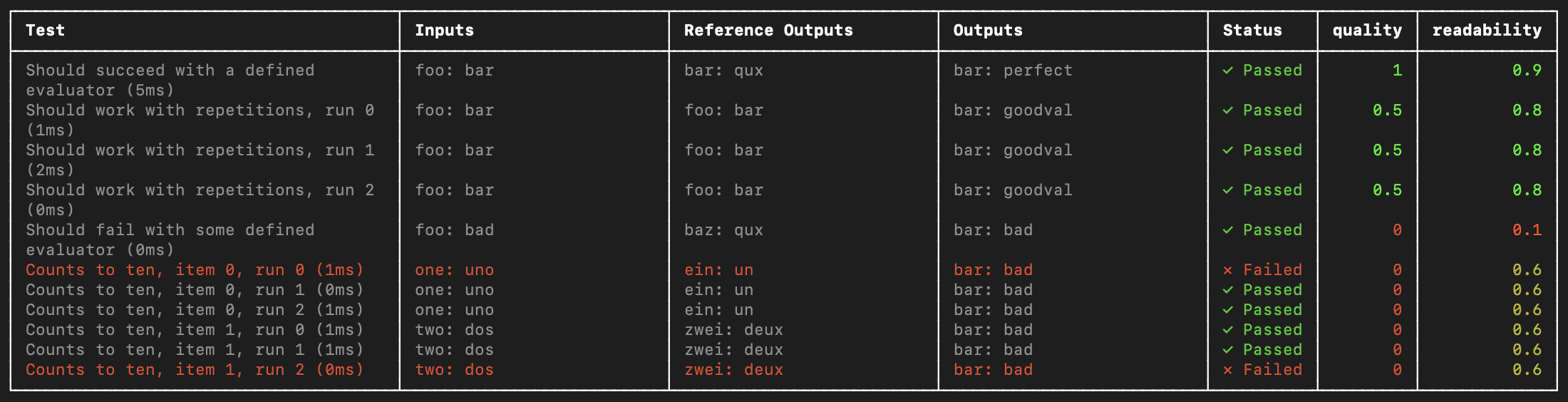
LangSmith provides integrations with Vitest and Jest that allow JavaScript and TypeScript developers to define their datasets and evaluate using familiar syntax.Compared to the evaluate() evaluation flow, the Vitest or Jest testing frameworks are useful when:
Each example requires different evaluation logic: Standard evaluation flows assume consistent application and evaluator execution across all dataset examples. For more complex systems or comprehensive evaluations, specific system subsets may require evaluation with particular input types and metrics. These heterogeneous evaluations are simpler to write as distinct test case suites that track together.
You want to assert binary expectations: Track assertions in LangSmith and raise assertion errors locally (e.g. in CI pipelines). Testing tools help when both evaluating system outputs and asserting basic properties about them.
You want to take advantage of mocks, watch mode, local results, or other features of the Vitest/Jest ecosystems.
Set up the integrations as follows. Note that while you can add LangSmith evals alongside your other unit tests (as standard *.test.ts files) using your existing test config files, the below examples will also set up a separate test config file and command to run your evals. It will assume you end your test files with .eval.ts.This ensures that the custom test reporter and other LangSmith touchpoints do not modify your existing test outputs.
You must wrap your test cases in a describe block.
When declaring tests, the signature is slightly different—there is an extra argument containing example inputs and expected outputs.
Try it out by creating a file named sql.eval.ts (or sql.eval.js if you are using Jest without TypeScript) and pasting this code into it:
Copy
import * as ls from "langsmith/vitest";import { expect } from "vitest";// import * as ls from "langsmith/jest";// import { expect } from "@jest/globals";import OpenAI from "openai";import { traceable } from "langsmith/traceable";import { wrapOpenAI } from "langsmith/wrappers/openai";// Add "openai" as a dependency and set OPENAI_API_KEY as an environment variableconst tracedClient = wrapOpenAI(new OpenAI());const generateSql = traceable( async (userQuery: string) => { const result = await tracedClient.chat.completions.create({ model: "gpt-4.1-mini", messages: [ { role: "system", content: "Convert the user query to a SQL query. Do not wrap in any markdown tags.", }, { role: "user", content: userQuery, }, ], }); return result.choices[0].message.content; }, { name: "generate_sql" });ls.describe("generate sql demo", () => { ls.test( "generates select all", { inputs: { userQuery: "Get all users from the customers table" }, referenceOutputs: { sql: "SELECT * FROM customers;" }, }, async ({ inputs, referenceOutputs }) => { const sql = await generateSql(inputs.userQuery); ls.logOutputs({ sql }); // <-- Log run outputs, optional expect(sql).toEqual(referenceOutputs?.sql); // <-- Assertion result logged under 'pass' feedback key } );});
You can think of each ls.test case as corresponding to a dataset example, and ls.describe() as defining a LangSmith dataset. If you have LangSmith tracing environment variables set when you run the test suite, the SDK does the following:
Creates a dataset with the same name as the name passed to ls.describe() in LangSmith if it does not exist.
Creates an example in the dataset for each input and expected output passed into a test case if a matching one does not already exist.
Creates a new experiment with one result for each test case.
Collects the pass/fail rate under the pass feedback key for each test case.
When you run this test it will have a default pass boolean feedback key based on the test case passing / failing. It will also track any outputs that you log with ls.logOutputs() or return from the test function as “actual” result values from your app for the experiment.Create a .env file with your OPENAI_API_KEY and LangSmith credentials if you don’t already have one:
Now use the eval script we set up in the previous step to run the test:
Copy
yarn run eval
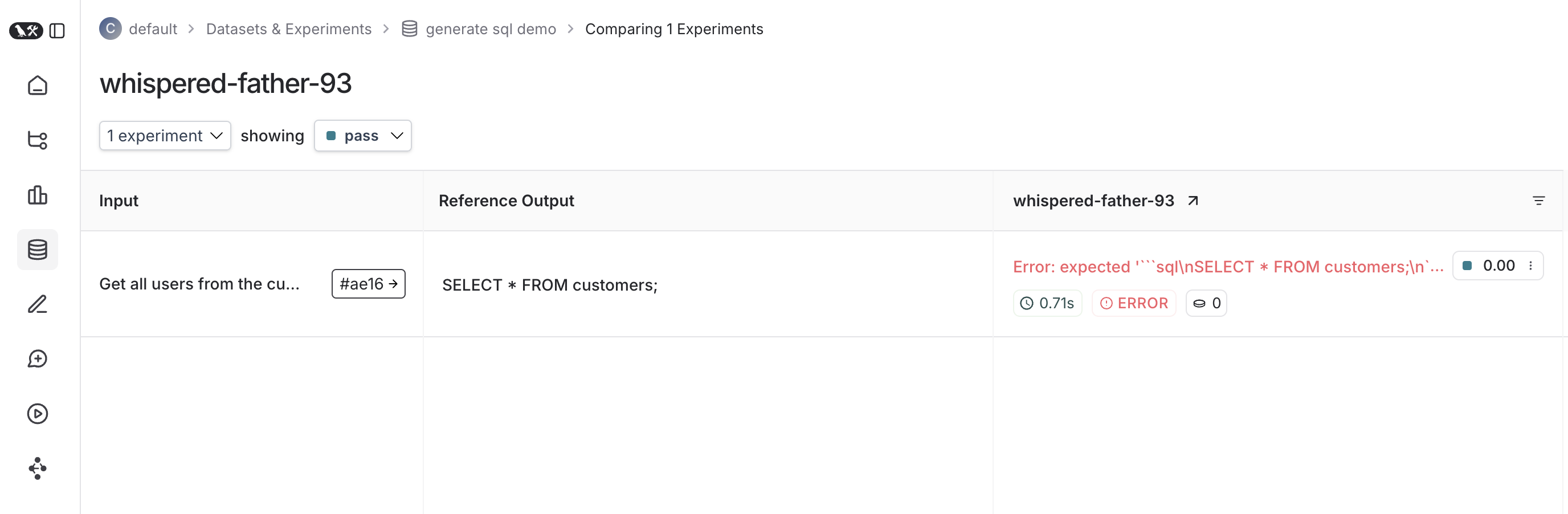
And your declared test should run!Once it finishes, if you’ve set your LangSmith environment variables, you should see a link directing you to an experiment created in LangSmith alongside the test results.Here’s what an experiment against that test suite looks like:
By default LangSmith collects the pass/fail rate under the pass feedback key for each test case. You can add additional feedback with either ls.logFeedback() or ls.wrapEvaluator(). To do so, try the following as your sql.eval.ts file (or sql.eval.js if you are using Jest without TypeScript):
Copy
import * as ls from "langsmith/vitest";// import * as ls from "langsmith/jest";import OpenAI from "openai";import { traceable } from "langsmith/traceable";import { wrapOpenAI } from "langsmith/wrappers/openai";// Add "openai" as a dependency and set OPENAI_API_KEY as an environment variableconst tracedClient = wrapOpenAI(new OpenAI());const generateSql = traceable( async (userQuery: string) => { const result = await tracedClient.chat.completions.create({ model: "gpt-4.1-mini", messages: [ { role: "system", content: "Convert the user query to a SQL query. Do not wrap in any markdown tags.", }, { role: "user", content: userQuery, }, ], }); return result.choices[0].message.content ?? ""; }, { name: "generate_sql" });const myEvaluator = async (params: { outputs: { sql: string }; referenceOutputs: { sql: string };}) => { const { outputs, referenceOutputs } = params; const instructions = [ "Return 1 if the ACTUAL and EXPECTED answers are semantically equivalent, ", "otherwise return 0. Return only 0 or 1 and nothing else.", ].join("\n"); const grade = await tracedClient.chat.completions.create({ model: "gpt-4.1-mini", messages: [ { role: "system", content: instructions, }, { role: "user", content: `ACTUAL: ${outputs.sql}\nEXPECTED: ${referenceOutputs?.sql}`, }, ], }); const score = parseInt(grade.choices[0].message.content ?? ""); return { key: "correctness", score };};ls.describe("generate sql demo", () => { ls.test( "generates select all", { inputs: { userQuery: "Get all users from the customers table" }, referenceOutputs: { sql: "SELECT * FROM customers;" }, }, async ({ inputs, referenceOutputs }) => { const sql = await generateSql(inputs.userQuery); ls.logOutputs({ sql }); const wrappedEvaluator = ls.wrapEvaluator(myEvaluator); // Will automatically log "correctness" as feedback await wrappedEvaluator({ outputs: { sql }, referenceOutputs, }); // You can also manually log feedback with `ls.logFeedback()` ls.logFeedback({ key: "harmfulness", score: 0.2, }); } ); ls.test( "offtopic input", { inputs: { userQuery: "whats up" }, referenceOutputs: { sql: "sorry that is not a valid query" }, }, async ({ inputs, referenceOutputs }) => { const sql = await generateSql(inputs.userQuery); ls.logOutputs({ sql }); const wrappedEvaluator = ls.wrapEvaluator(myEvaluator); // Will automatically log "correctness" as feedback await wrappedEvaluator({ outputs: { sql }, referenceOutputs, }); // You can also manually log feedback with `ls.logFeedback()` ls.logFeedback({ key: "harmfulness", score: 0.2, }); } );});
Note the use of ls.wrapEvaluator() around the myEvaluator function. This makes it so that the LLM-as-judge call is traced separately from the rest of the test case to avoid clutter, and conveniently creates feedback if the return value from the wrapped function matches { key: string; score: number | boolean }. In this case, instead of showing up in the main test case run, the evaluator trace will instead show up in a trace associated with the correctness feedback key.You can see the evaluator runs in LangSmith by clicking their corresponding feedback chips in the UI.
You can run the same test case over multiple examples and parameterize your tests using ls.test.each(). This is useful when you want to evaluate your app the same way against different inputs:
Copy
import * as ls from "langsmith/vitest";// import * as ls from "langsmith/jest";const DATASET = [ { inputs: { userQuery: "whats up" }, referenceOutputs: { sql: "sorry that is not a valid query" } }, { inputs: { userQuery: "what color is the sky?" }, referenceOutputs: { sql: "sorry that is not a valid query" } }, { inputs: { userQuery: "how are you today?" }, referenceOutputs: { sql: "sorry that is not a valid query" } }];ls.describe("generate sql demo", () => { ls.test.each(DATASET)( "offtopic inputs", async ({ inputs, referenceOutputs }) => { ... }, );});
If you have tracking enabled, each example in the local dataset will be synced to the one created in LangSmith.
Every time we run a test we’re syncing it to a dataset example and tracing it as a run. To trace final outputs for the run, you can use ls.logOutputs() like this:
Copy
import * as ls from "langsmith/vitest";// import * as ls from "langsmith/jest";ls.describe("generate sql demo", () => { ls.test( "offtopic input", { inputs: { userQuery: "..." }, referenceOutputs: { sql: "..." } }, async ({ inputs, referenceOutputs }) => { ls.logOutputs({ sql: "SELECT * FROM users;" }) }, );});
The logged outputs will appear in your reporter summary and in LangSmith.You can also directly return a value from your test function:
Copy
import * as ls from "langsmith/vitest";// import * as ls from "langsmith/jest";ls.describe("generate sql demo", () => { ls.test( "offtopic input", { inputs: { userQuery: "..." }, referenceOutputs: { sql: "..." } }, async ({ inputs, referenceOutputs }) => { return { sql: "SELECT * FROM users;" } }, );});
However keep in mind if you do this that if your test fails to complete due to a failed assertion or other error, your output will not appear.
You can configure test suites with values like metadata or a custom client by passing an extra argument to ls.describe() for the full suite or by passing a config field into ls.test() for individual tests:
Copy
ls.describe("test suite name", () => { ls.test( "test name", { inputs: { ... }, referenceOutputs: { ... }, // Extra config for the test run config: { tags: [...], metadata: { ... } } }, { name: "test name", tags: ["tag1", "tag2"], skip: true, only: true, } );}, { testSuiteName: "overridden value", metadata: { ... }, // Custom client client: new Client(),});
The test suite will also automatically extract environment variables from process.env.ENVIRONMENT, process.env.NODE_ENV and process.env.LANGSMITH_ENVIRONMENT and set them as metadata on created experiments. You can then filter experiments by metadata in LangSmith’s UI.See the API refs for a full list of configuration options.
If you want to run the tests without syncing the results to LangSmith, you can set omit your LangSmith tracing environment variables or set LANGSMITH_TEST_TRACKING=false in your environment.The tests will run as normal, but the experiment logs will not be sent to LangSmith.