Memory is a system that remembers information about previous interactions. For AI agents, memory is crucial because it lets them remember previous interactions, learn from feedback, and adapt to user preferences. As agents tackle more complex tasks with numerous user interactions, this capability becomes essential for both efficiency and user satisfaction.Short term memory lets your application remember previous interactions within a single thread or conversation.
A thread organizes multiple interactions in a session, similar to the way email groups messages in a single conversation.
Conversation history is the most common form of short-term memory. Long conversations pose a challenge to today’s LLMs; a full history may not fit inside an LLM’s context window, resulting in an context loss or errors.Even if your model supports the full context length, most LLMs still perform poorly over long contexts. They get “distracted” by stale or off-topic content, all while suffering from slower response times and higher costs.Chat models accept context using messages, which include instructions (a system message) and inputs (human messages). In chat applications, messages alternate between human inputs and model responses, resulting in a list of messages that grows longer over time. Because context windows are limited, many applications can benefit from using techniques to remove or “forget” stale information.
To add short-term memory (thread-level persistence) to an agent, you need to specify a checkpointer when creating an agent.
LangChain’s agent manages short-term memory as a part of your agent’s state.By storing these in the graph’s state, the agent can access the full context for a given conversation while maintaining separation between different threads.State is persisted to a database (or memory) using a checkpointer so the thread can be resumed at any time.Short-term memory updates when the agent is invoked or a step (like a tool call) is completed, and the state is read at the start of each step.
Copy
import { createAgent } from "langchain";import { MemorySaver } from "@langchain/langgraph";const checkpointer = new MemorySaver();const agent = createAgent({ model: "claude-sonnet-4-5-20250929", tools: [], checkpointer,});await agent.invoke( { messages: [{ role: "user", content: "hi! i am Bob" }] }, { configurable: { thread_id: "1" } });
For more checkpointer options including SQLite, Postgres, and Azure Cosmos DB, see the list of checkpointer libraries in the Persistence documentation.
You can extend the agent state by creating custom middleware with a state schema. Custom state schemas can be passed using the stateSchema parameter in middleware. Use the StateSchema class for state definitions preferably (plain Zod objects are also supported).
Copy
import { createAgent, createMiddleware } from "langchain";import { StateSchema, MemorySaver } from "@langchain/langgraph";import * as z from "zod";const CustomState = new StateSchema({ userId: z.string(), preferences: z.record(z.string(), z.any()), }); const stateExtensionMiddleware = createMiddleware({ name: "StateExtension", stateSchema: CustomState, });const checkpointer = new MemorySaver();const agent = createAgent({ model: "gpt-5", tools: [], middleware: [stateExtensionMiddleware], checkpointer,});// Custom state can be passed in invokeconst result = await agent.invoke({ messages: [{ role: "user", content: "Hello" }], userId: "user_123", preferences: { theme: "dark" }, });
Most LLMs have a maximum supported context window (denominated in tokens).One way to decide when to truncate messages is to count the tokens in the message history and truncate whenever it approaches that limit. If you’re using LangChain, you can use the trim messages utility and specify the number of tokens to keep from the list, as well as the strategy (e.g., keep the last maxTokens) to use for handling the boundary.To trim message history in an agent, use createMiddleware with a beforeModel hook:
You can delete messages from the graph state to manage the message history.This is useful when you want to remove specific messages or clear the entire message history.To delete messages from the graph state, you can use the RemoveMessage. For RemoveMessage to work, you need to use a state key with messagesStateReducerreducer, like MessagesValue.To remove specific messages:
Copy
import { RemoveMessage } from "@langchain/core/messages";const deleteMessages = (state) => { const messages = state.messages; if (messages.length > 2) { // remove the earliest two messages return { messages: messages .slice(0, 2) .map((m) => new RemoveMessage({ id: m.id })), }; }};
When deleting messages, make sure that the resulting message history is valid. Check the limitations of the LLM provider you’re using. For example:
Some providers expect message history to start with a user message
Most providers require assistant messages with tool calls to be followed by corresponding tool result messages.
[[ "human", "hi! I'm bob" ]][[ "human", "hi! I'm bob" ], [ "ai", "Hello, Bob! How can I assist you today?" ]][[ "human", "hi! I'm bob" ], [ "ai", "Hello, Bob! How can I assist you today?" ]][[ "human", "hi! I'm bob" ], [ "ai", "Hello, Bob! How can I assist you today" ], ["human", "what's my name?" ]][[ "human", "hi! I'm bob" ], [ "ai", "Hello, Bob! How can I assist you today?" ], ["human", "what's my name?"], [ "ai", "Your name is Bob, as you mentioned. How can I help you further?" ]][[ "human", "what's my name?" ], [ "ai", "Your name is Bob, as you mentioned. How can I help you further?" ]]
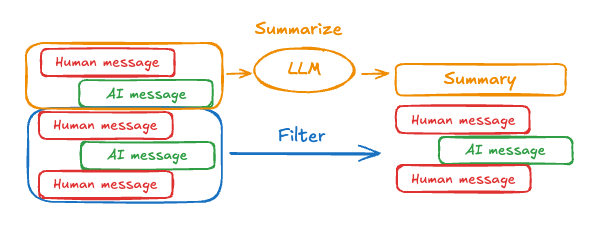
The problem with trimming or removing messages, as shown above, is that you may lose information from culling of the message queue.
Because of this, some applications benefit from a more sophisticated approach of summarizing the message history using a chat model.To summarize message history in an agent, use the built-in summarizationMiddleware:
Copy
import { createAgent, summarizationMiddleware } from "langchain";import { MemorySaver } from "@langchain/langgraph";const checkpointer = new MemorySaver();const agent = createAgent({ model: "gpt-4.1", tools: [], middleware: [ summarizationMiddleware({ model: "gpt-4.1-mini", trigger: { tokens: 4000 }, keep: { messages: 20 }, }), ], checkpointer,});const config = { configurable: { thread_id: "1" } };await agent.invoke({ messages: "hi, my name is bob" }, config);await agent.invoke({ messages: "write a short poem about cats" }, config);await agent.invoke({ messages: "now do the same but for dogs" }, config);const finalResponse = await agent.invoke({ messages: "what's my name?" }, config);console.log(finalResponse.messages.at(-1)?.content);// Your name is Bob!
Access short term memory (state) in a tool using the runtime parameter (typed as ToolRuntime).The runtime parameter is hidden from the tool signature (so the model doesn’t see it), but the tool can access the state through it.
Copy
import { createAgent, tool, type ToolRuntime } from "langchain";import { StateSchema } from "@langchain/langgraph";import * as z from "zod";const CustomState = new StateSchema({ userId: z.string(),});const getUserInfo = tool( async (_, config: ToolRuntime<typeof CustomState.State>) => { const userId = config.state.userId; return userId === "user_123" ? "John Doe" : "Unknown User"; }, { name: "get_user_info", description: "Get user info", schema: z.object({}), });const agent = createAgent({ model: "gpt-5-nano", tools: [getUserInfo], stateSchema: CustomState,});const result = await agent.invoke( { messages: [{ role: "user", content: "what's my name?" }], userId: "user_123", }, { context: {}, });console.log(result.messages.at(-1)?.content);// Outputs: "Your name is John Doe."
To modify the agent’s short-term memory (state) during execution, you can return state updates directly from the tools.This is useful for persisting intermediate results or making information accessible to subsequent tools or prompts.
Copy
import { tool, createAgent, ToolMessage, type ToolRuntime } from "langchain";import { Command, StateSchema } from "@langchain/langgraph";import * as z from "zod";const CustomState = new StateSchema({ userId: z.string().optional(),});const updateUserInfo = tool( async (_, config: ToolRuntime<typeof CustomState.State>) => { const userId = config.state.userId; const name = userId === "user_123" ? "John Smith" : "Unknown user"; return new Command({ update: { userName: name, // update the message history messages: [ new ToolMessage({ content: "Successfully looked up user information", tool_call_id: config.toolCall?.id ?? "", }), ], }, }); }, { name: "update_user_info", description: "Look up and update user info.", schema: z.object({}), });const greet = tool( async (_, config) => { const userName = config.context?.userName; return `Hello ${userName}!`; }, { name: "greet", description: "Use this to greet the user once you found their info.", schema: z.object({}), });const agent = createAgent({ model: "openai:gpt-5-mini", tools: [updateUserInfo, greet], stateSchema: CustomState,});const result = await agent.invoke({ messages: [{ role: "user", content: "greet the user" }], userId: "user_123",});console.log(result.messages.at(-1)?.content);// Output: "Hello! I’m here to help — what would you like to do today?"